
FoodExpoConnect Blog
How to Find Food Importers Using Apollo.io: A 15-Minute Guide
Stop cold-calling the wrong people. Apollo.io gives food exporters instant access to 275M+ verified B2B contacts — here's exactly how to build your first importer list in 15 minutes.
International Buyer Directory
Verified contact information for international food buyers in 50+ countries
The Problem with Traditional Food Export Prospecting
If you've attended a trade show, you know the drill: three exhausting days, 200 business cards, and then six months of chasing people who gave you a generic info@ email.
The global food and beverage B2B market is worth over $9 trillion. Buyers are out there — the problem is finding the right ones with verified contact details, before your competitors do.
What you'll learn in this guide:
- How to build a targeted list of food importers in under 15 minutes
- Which Apollo.io filters matter most for food industry prospecting
- How to launch an automated email sequence that books meetings while you sleep
- The exact workflow FoodExpoConnect users combine with Apollo for maximum reach
What is Apollo.io?
Apollo.io is a B2B sales intelligence platform with 275M+ verified contacts and 73M+ company profiles. It lets you:
- Search and filter decision-makers by industry, job title, country, company size, and revenue
- Find verified emails and phone numbers — directly from LinkedIn or Apollo's database
- Build automated outreach sequences — multi-step email campaigns that follow up for you
- Track intent data — see which companies are actively searching for new suppliers
It's used by 160,000+ sales teams globally. For food exporters, it fills a critical gap: FoodExpoConnect gives you trade show buyers; Apollo gives you everyone else in the world.
Step 1: Set Up Your Apollo.io Account (Free)
Start with the free plan — it includes 50 email credits per month and full access to search filters.
- Go to get.apollo.io/foodexpoconnect
- Sign up with your work email (Google or Microsoft SSO works)
- Install the Chrome extension — this is key for enriching LinkedIn profiles later
- Connect your Gmail or Outlook for sequence tracking
No credit card required for the free plan.
Step 2: Build Your Importer List Using Apollo's Search Filters
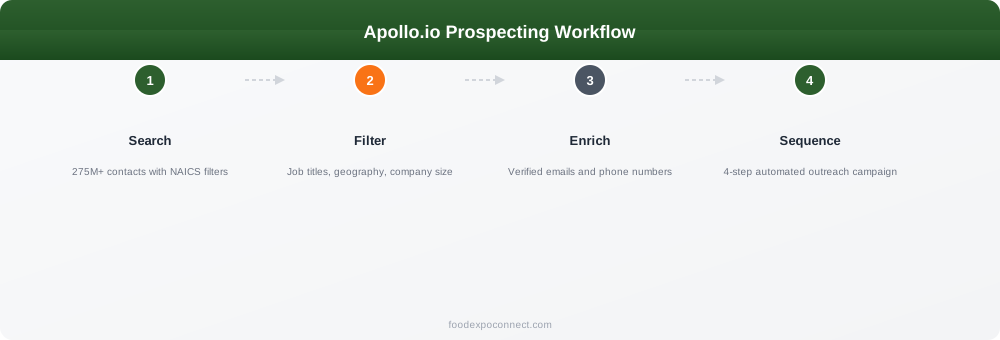
This is where the magic happens. Click Search → People in the Apollo sidebar.
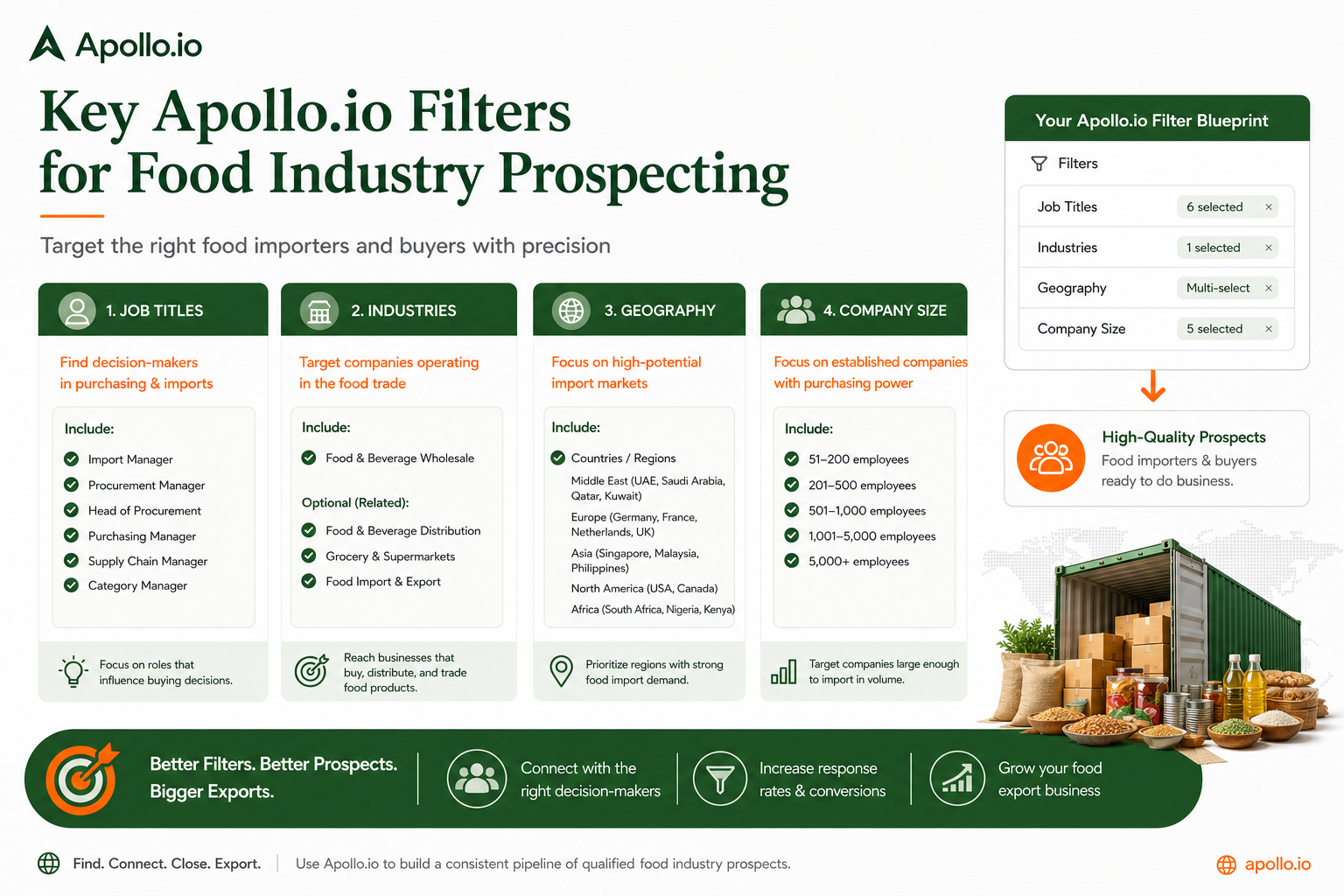
The Key Filters for Food Exporters
Industry — Select these SIC/NAICS codes:
- Food & Beverage Wholesale
- Specialty Food Stores
- Import & Export (Food)
- Grocery & Food Distribution
Job Titles — Target decision-makers directly:
- Purchasing Manager
- Import Director
- Head of Procurement
- Category Buyer (Food & Beverage)
- Supply Chain Director
Geography — Focus on your target markets first. For EU buyers: Germany, Netherlands, France, UK. For US: California, New York, Florida.
Company Size — 50–500 employees is the sweet spot for importers with budget but without bureaucratic procurement committees.
Example: Finding EU Cashew Nut Importers
| Filter | Value |
|---|---|
| Industry | Food & Beverage Wholesale |
| Keywords | "cashew" OR "nuts" OR "tree nuts" |
| Job Title | Purchasing Manager, Import Director |
| Country | Germany, Netherlands, Belgium |
| Company Size | 50–500 employees |
This typically returns 200–400 verified contacts ready in under 10 minutes.
Step 3: Verify and Enrich Your Contacts
In Apollo:
- Select your filtered contacts
- Click Export — Apollo verifies emails automatically during export
- Bounced emails are replaced with Apollo's best-guess alternative
Chrome Extension Workflow:
- Browse LinkedIn profiles of target importers
- Click the Apollo extension icon on any profile
- Apollo pulls the verified email and phone number in real time
- One click saves it to your Apollo list
Apollo claims a 98%+ email deliverability rate.
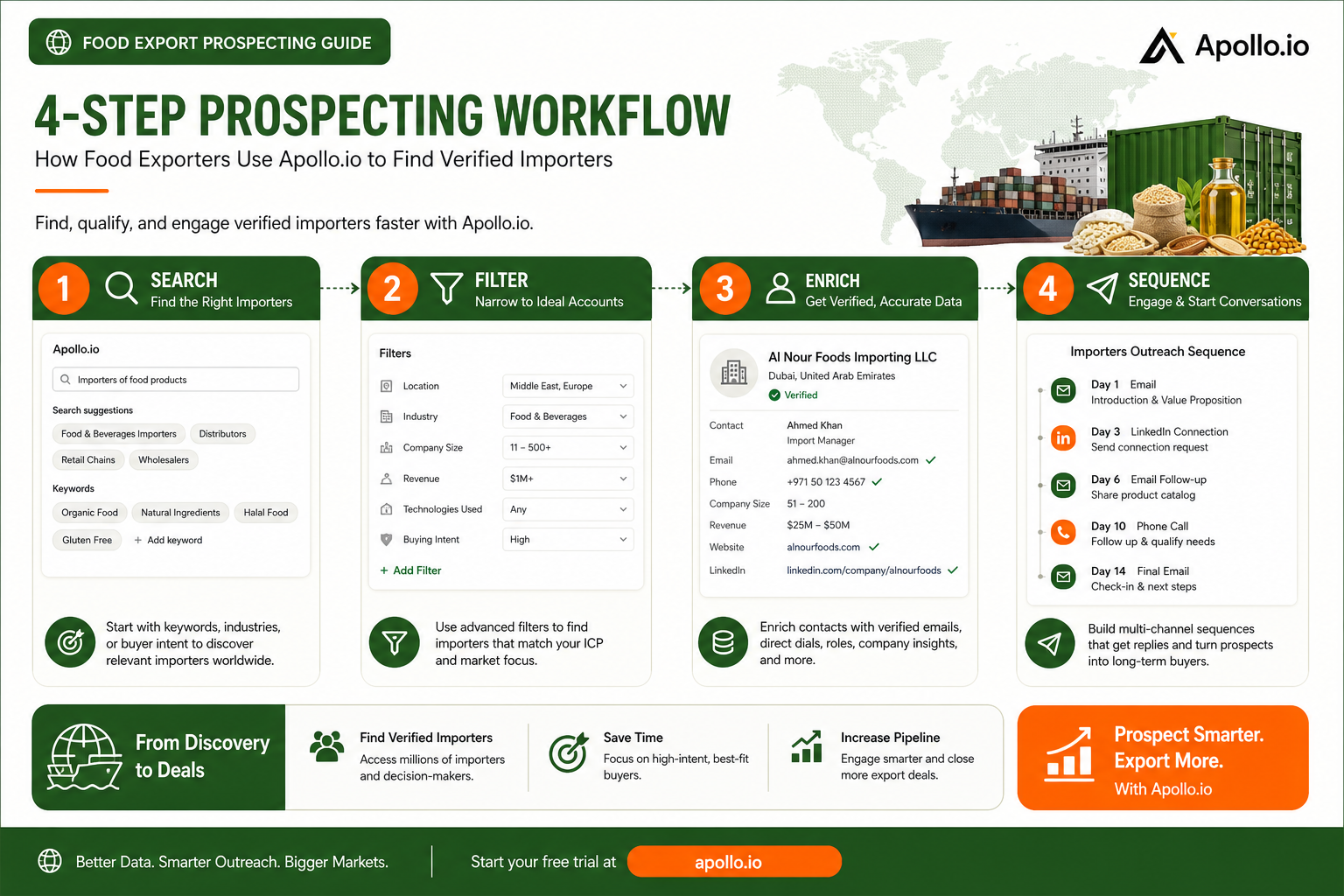
Step 4: Launch a 4-Step Outreach Sequence
Email 1 (Day 1) — The Hook: personalised intro + your unique value + one question
Email 2 (Day 4) — The Value Add: share your SGS certificate, product spec sheet, or food safety audit
Email 3 (Day 9) — Social Proof: reference a similar buyer in the same market
Email 4 (Day 16) — The Soft Close: short, honest, direct. Include your calendar link.
Apollo automates all four steps — set it once and it runs.
Step 5: Combine Apollo with FoodExpoConnect Data
- Export your FoodExpoConnect buyer contacts after a trade show
- Upload them to Apollo as a custom list
- Use Apollo to enrich any missing emails or LinkedIn profiles
- Build a sequence for warm trade show contacts vs. cold Apollo-sourced prospects
- Track everything in Apollo's analytics — open rates, reply rates, meeting bookings
Common Mistakes to Avoid
- Targeting too broadly — Always add job title and company size filters to reach decision-makers
- Skipping intent data — Prioritise companies actively searching for suppliers right now
- No personalisation — Use Apollo's custom variables in every template
- Giving up after one email — 80% of sales need 5+ follow-ups; most replies come on emails 3 and 4
🎯 Download the Apollo.io Prospecting Template →
Pre-built Apollo.io search filters and outreach sequences specifically configured for finding food importers. Copy-paste-ready search parameters for 5 target buyer types.
Free download — no email required.
Conclusion
Apollo.io extends your reach far beyond who shows up at trade shows. Combined with FoodExpoConnect, you have the most complete B2B food prospecting system available.
Next steps:
- Start your free Apollo.io account — no card needed
- Build your first importer list using the filters above
- Launch your first 4-step sequence this week
FAQ
How many contacts can I find for free on Apollo.io?
The free plan gives 50 email credits and 5 mobile credits per month, with sequences up to 250 contacts — enough to test the workflow and book first meetings before upgrading.
Is Apollo.io GDPR compliant for EU prospecting?
Apollo operates under legitimate interest provisions of GDPR for B2B prospecting. Every email includes an unsubscribe link. Check Apollo's privacy policy for details.
What's the difference between Apollo.io and LinkedIn Sales Navigator?
Apollo gives you verified emails and phone numbers directly — Sales Navigator does not. Apollo also has built-in outreach sequences. See our full comparison: Apollo vs Sales Navigator vs ZoomInfo.
Can I integrate Apollo with my CRM?
Yes — Apollo integrates with HubSpot, Salesforce, Pipedrive, Zoho, and more. Contacts and activities sync automatically.
Ready to find your next food importer? Start free on Apollo.io →
Affiliate disclosure: FoodExpoConnect may earn a commission if you sign up through our link, at no extra cost to you.
Quick facts
Published: 5/21/2026
Reading time: 9 min
Pillars: export-success
Written by

Jean Marc Koffi
Co-authorJournalist & Export SpecialistLondon
Jean Marc Koffi is an MBA-trained trade specialist who connects African exporters to global buyers, with over $20M in contracts facilitated and expertise recognized by major trade organizations. Noted for rapid buyer network building, he is an experienced speaker and certified in trade facilitation, origin rules, and food safety.

Alocha Massamba
Co-authorFounder, Epifresh & FoodExpoConnectLondon
Alocha Massamba is the founder of Epifresh and FoodExpoConnect. He builds the technology, data and partnerships that connect African food producers and exporters to international buyers — with a focus on fresh-produce supply chains, cold-chain logistics, and the buyer-discovery platforms small and mid-size exporters need to compete with global incumbents.
Explore more export intelligence
Certification • Pricing Strategy • Market Access
5 Certifications Worth More Than a Price Cut in 2026
Stop competing on price. Organic, Fair Trade, Rainforest Alliance, B Corp, and SQF certifications can command 20-300% price premiums for African food exporters in 2026. Here is the ROI data for each.
Coffee Export • Market Access • EU Regulations
Coffee Export 2026: African Origins, Fair Trade Pricing & EU Market Access
Complete guide to coffee export from Ethiopia, Kenya and Rwanda — EUDR compliance, fair trade pricing, certification requirements, and how to access €12-18/kg EU buyer contracts in 2026.
Market Access • Africa Trade • Export Strategy
China Zero-Tariff Policy for African Food Exporters: Coffee Imports Surge 145.7% — How to Enter the World's Largest Market Duty-Free
China's zero-tariff policy covering 53 African countries is already producing dramatic results — coffee imports surged 145.7% in the first five months. How food exporters can access this duty-free window and bypass traditional tariff barriers.